Lesson 4: Data Augmentation & CNN Architectures
Learning Objectives
- Understand why and when we use data augmentation for vision models
- Recognize common augmentation operations and how to implement them in PyTorch
- Build intuition for the evolution of CNN architectures from LeNet to ResNet
- Connect CNN features to downstream tasks like object tracking
Recap: CNNs and Overfitting
- CNNs can have millions of parameters and easily memorize the training set
- Overfitting symptoms: training loss \(\downarrow\) while validation loss \(\uparrow\) or plateaus early
- We already saw regularization like Dropout and stabilization techniques like BatchNorm
- In this lesson we add weight decay and data augmentation to our toolkit
Regularization with Weight Decay
Weight decay (L2 regularization) discourages very large weights by adding a penalty to the loss.
\[ L_{\text{total}} = L_{\text{data}} + \lambda \lVert W \rVert_2^2 \]
- \(\lambda\) controls the strength of the penalty (e.g., \(10^{-4}\) or \(10^{-3}\))
- Encourages simpler models and can reduce overfitting, especially with many parameters
- In PyTorch, set
weight_decayin the optimizer instead of manually modifying the loss
import torch.optim as optim

optimizer = optim.Adam(model.parameters(),
                       lr=1e-3,
                       weight_decay=1e-4)  # L2 penalty
Combine weight decay with Dropout, BatchNorm, and data augmentation for more robust CNNs.
Idea: Data Augmentation
Data augmentation creates new training examples by applying label-preserving transformations.
- Example: flipping, rotating, cropping, or color-jittering images
- We do not change the label — a rotated cat is still a cat
- Model learns to be robust to common variations (pose, lighting, small translations)
- Acts like training on a much larger dataset without collecting more images
Types of Augmentation
- Random crop / resize
- Horizontal / vertical flip
- Small rotations (e.g., \(\pm 10^\circ\))
- Random affine transforms (scale, shear)
- Brightness / contrast changes
- Color jitter (hue, saturation)
- Gaussian noise or blur
- Random grayscale
- Choose transforms that make sense for your data and task (e.g., avoid vertical flips for digits)
Data Augmentation Pipeline
digraph aug_pipeline {
  rankdir=LR;
  node [fontsize=13, shape=box, style=rounded, height=0.7];
  edge [penwidth=1.5];
  graph [nodesep=0.7, ranksep=0.9];

  raw   [label="Original image\n(train sample)"];
  aug   [label="Random transforms\n(flip, rotate, color jitter)", style="filled,rounded", fillcolor="#fff3e0"];
  batch [label="Augmented batch\n(x_batch, y_batch)"];
  model [label="CNN model\n(f(x; θ))", style="filled,rounded", fillcolor="#e3f2fd"];

  raw -> aug -> batch -> model;
}
Each epoch, the same image can look different → the model sees a stream of varied views.
PyTorch: Augmentation with torchvision.transforms
import torchvision.transforms as T

train_transform = T.Compose([
    T.RandomHorizontalFlip(p=0.5),
    T.RandomRotation(degrees=10),
    T.ColorJitter(brightness=0.2, contrast=0.2),
    T.ToTensor(),
    T.Normalize((0.1307,), (0.3081,)),  # MNIST stats
])

test_transform = T.Compose([
    T.ToTensor(),
    T.Normalize((0.1307,), (0.3081,)),
])
Apply train_transform only to training data; keep validation/test transforms deterministic.
Using Transforms in a Dataset
from torchvision import datasets
from torch.utils.data import DataLoader

train_ds = datasets.MNIST(
    root="data",
    train=True,
    download=True,
    transform=train_transform,
)

test_ds = datasets.MNIST(
    root="data",
    train=False,
    download=True,
    transform=test_transform,
)

train_loader = DataLoader(train_ds, batch_size=64, shuffle=True)
test_loader = DataLoader(test_ds, batch_size=128)
Every time train_loader samples an image, a fresh random augmentation is applied.
Choosing Augmentations Carefully
- Valid if the transform does not change the label
- Digits (MNIST): horizontal flips or 180° rotations can change a “6” into a “9” → avoid
- Natural images: flips and small rotations are usually safe
- Domain-specific tasks (medical, documents) require extra care and domain knowledge
When Does Augmentation Help Most?
- You have limited labeled data and a relatively large model
- Test-time conditions are diverse: different devices, lighting, or viewpoints
- You want robustness to small perturbations (cropping, noise, color shifts)
- Often combined with Dropout/BatchNorm and early stopping
From LeNet to Modern CNNs
Architecture design evolved, but core building blocks stayed similar.
- LeNet-5 (1998): small CNN for digits (MNIST-like); conv → pool → conv → pool → FC
- AlexNet (2012): deeper CNN for ImageNet; ReLU, Dropout, trained on GPU
- VGG (2014): very deep, simple stacks of \(3\times3\) convs and max pooling
- Inception / GoogLeNet (2014): multi-branch “Inception” modules with different kernel sizes
- ResNet (2015): residual connections (skip connections) enabled very deep networks
AlexNet: Bigger CNN for ImageNet
- Problem: ImageNet has millions of RGB images and 1000 classes — LeNet is too small and shallow.
- Key ideas: deeper conv stack (5 conv + 3 FC), ReLU everywhere, Dropout in fully connected layers, trained on GPUs.
- What it solved: showed CNNs can scale to large, real-world datasets and dramatically beat hand-crafted features.
- Trade-offs: large model (tens of millions of parameters), heavy compute and memory usage.
AlexNet Architecture (Diagram)
High-level view of the original AlexNet layers (input, conv / pooling blocks, fully connected head).
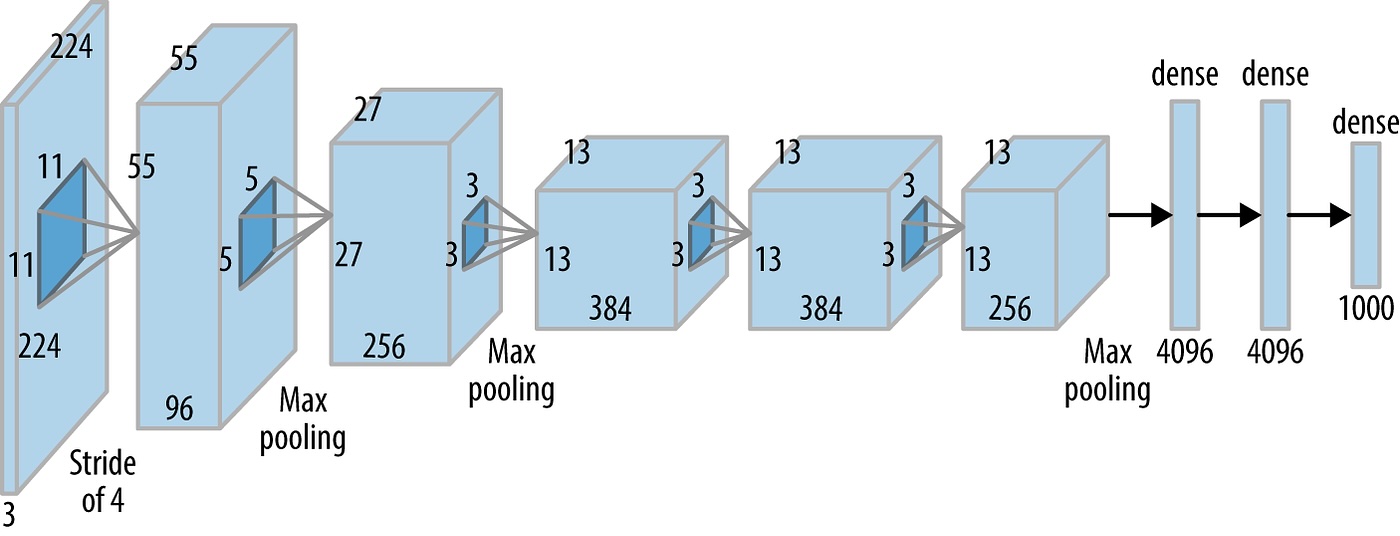
Architecture Sketch: LeNet vs AlexNet
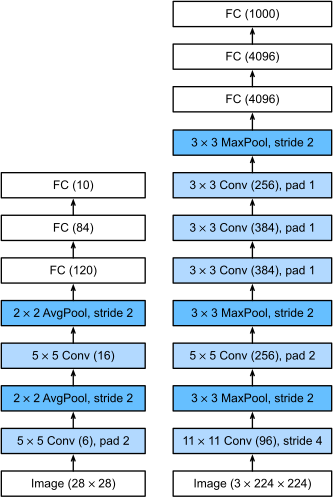
LeNet vs AlexNet (Summary)
Both use conv + nonlinearity + pooling → fully connected layers; AlexNet scales this pattern up for large-scale vision.
- Why AlexNet? ImageNet is much larger and more varied than MNIST, so we need a deeper, higher-capacity CNN.
- How: more conv layers, many more channels, aggressive pooling, and heavy use of ReLU + Dropout.
- Key changes vs LeNet: supports RGB images, trains on GPUs, and scales up width/depth to handle 1000-way classification.
VGG: Deep and Simple
- Key idea: stack many \(3\times3\) conv layers instead of a few large kernels
- Pattern: \((\text{Conv} \rightarrow \text{ReLU})\) repeated 2–3 times → max pool → repeat
- Why: deeper networks capture more complex patterns; keeping blocks identical simplifies design and tuning.
- Changes vs AlexNet: replaces large, varied kernels with repeated \(3\times3\) convs, trading width for depth and regular structure.
- Downside: many parameters and heavy computation (expensive without modern accelerators).
# simplified VGG-style block
import torch.nn as nn

vgg_block = nn.Sequential(
    nn.Conv2d(64, 64, kernel_size=3, padding=1),
    nn.ReLU(),
    nn.Conv2d(64, 64, kernel_size=3, padding=1),
    nn.ReLU(),
    nn.MaxPool2d(2),  # spatial size / 2
)
Inception: Multi-Scale Features
Inception modules apply multiple filter sizes in parallel and concatenate outputs.
digraph inception_block {
  rankdir=TB;
  node [fontsize=10, shape=box, style=rounded];

  input  [label="input feature map"];
  b1_1x1 [label="1×1 conv"];
  b2_1x1 [label="1×1 conv\n(reduce)"];
  b2_3x3 [label="3×3 conv"];
  b3_1x1 [label="1×1 conv\n(reduce)"];
  b3_5x5 [label="5×5 conv"];
  b4_pool [label="3×3 max pool"];
  b4_1x1 [label="1×1 conv"];
  concat [label="concat\nchannels"];

  input -> b1_1x1 -> concat;
  input -> b2_1x1 -> b2_3x3 -> concat;
  input -> b3_1x1 -> b3_5x5 -> concat;
  input -> b4_pool -> b4_1x1 -> concat;
}
Network chooses useful features at multiple scales (1×1, 3×3, 5×5) in the same layer.
- Why: different objects and patterns appear at different scales; a single kernel size can miss useful structure.
- How: parallel branches with 1×1, 3×3, 5×5 convs and pooling, plus 1×1 “bottlenecks” to keep compute affordable.
- Changes vs VGG: moves from a single conv path per block to multi-branch modules that learn multi-scale features in one stage.
ResNet: Residual Connections
Residual (skip) connections help train very deep networks by making layers learn a residual correction.
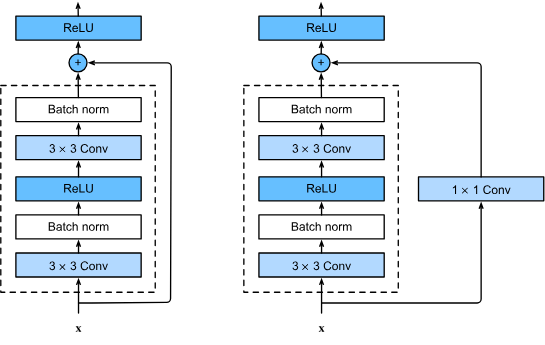
- Why: very deep plain networks are hard to train (vanishing gradients, degradation — deeper nets perform worse).
- How: each block learns a residual \(F(x)\); the skip connection lets gradients flow directly through \(x\).
ResNet: Going Deeper
Stacking many residual blocks with skip connections makes 50–100+ layer CNNs trainable in practice.
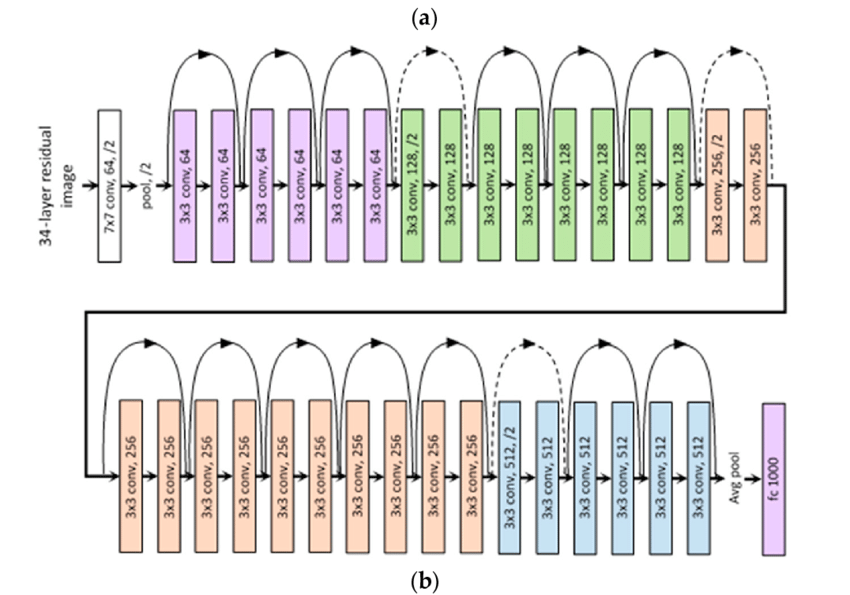
- Changes vs Inception/VGG: focuses on depth with identity shortcuts instead of complex multi-branch modules.
- Residual paths act like “highways” for gradients, reducing vanishing-gradient issues in very deep models.
Code: Simple Residual Block (PyTorch)
class BasicBlock(nn.Module):
    def __init__(self, in_ch, out_ch):
        super().__init__()
        self.conv = nn.Sequential(
            nn.Conv2d(in_ch, out_ch, 3, padding=1),
            nn.BatchNorm2d(out_ch),
            nn.ReLU(),
            nn.Conv2d(out_ch, out_ch, 3, padding=1),
            nn.BatchNorm2d(out_ch),
        )
        self.relu = nn.ReLU()

    def forward(self, x):
        out = self.conv(x)
        out = out + x  # skip connection (same shape)
        return self.relu(out)
Here the block learns a residual \(F(x)\) and adds it back to the original input \(x\) before the final ReLU.
xResNet: Inception-Inspired CNN
- xResNet variants combine residual connections with Inception-style improvements for efficiency.
- Depthwise separable convolutions: factor a standard conv into cheaper steps (per-channel spatial conv + 1×1 mixing) to reduce parameters and FLOPs.
- Batch normalization + ReLU: stabilize training and allow deeper networks.
- Global average pooling: replace large fully-connected layers with a compact pooling + small classifier head.
Depthwise Separable Convolutions
- Standard conv: every filter looks at all input channels at once (expensive: \(k \times k \times C_{in} \times C_{out}\)).
- Depthwise step: apply one \(k \times k\) filter per input channel (no channel mixing yet).
- Pointwise step: a cheap \(1 \times 1\) conv mixes channels to get the desired \(C_{out}\).
- Total cost is much lower, so we can build deeper or wider CNNs with similar compute and better accuracy.
Depthwise Separable Conv: xResNet18 Block
xResNet18-style block: depthwise + pointwise conv inside a residual (skip) connection.
digraph depthwise_sep_conv {
  rankdir=LR;
  node [fontsize=10, shape=box, style=rounded];

  input     [label="input\nfrom previous block"];
  depthwise [label="depthwise conv\nk×k per channel"];
  pointwise [label="pointwise conv\n1×1 across channels"];
  skip      [label="skip / identity\n(optional 1×1 conv)"];
  add       [label="add\n(residual + conv output)"];
  output    [label="output\nto next block"];

  input -> depthwise -> pointwise -> add -> output;
  input -> skip -> add;
}
Transfer Learning with CNNs
- Modern practice: start from a CNN pre-trained on a large dataset (e.g., ImageNet)
- Freeze most convolutional layers; replace and train the final classifier head
- Works well even with limited labeled data in your domain
- In this lesson we implement transfer learning with data augmentation in the companion notebook
Transfer Learning with xResNet18
- Use a pretrained
xresnet18backbone instead of training all weights from scratch on CIFAR-10. - Phase 1 (frozen): freeze early layers and train only the new classification head for a few epochs.
- Phase 2 (fine-tune): unfreeze more layers and train with a smaller learning rate to gently adapt pretrained features.
- Helps small or medium-sized datasets achieve higher accuracy and faster convergence with less overfitting.
Switch to Notebook / Code
- Open
notebooks/lesson4_data_augmentation.ipynb - Add and visualize data augmentation for your training images
- Apply transfer learning with a pre-trained CNN (e.g., ResNet) on a smaller dataset
- Compare results with and without augmentation / fine-tuning
Image Feature Vectors
- A feature vector is a numeric representation of an image: a 1D vector \([f_1, f_2, \dots, f_d]\).
- A pretrained CNN (e.g.,
xresnet18) maps each image to a point in a high-dimensional space (e.g., 512-D). - Nearby points correspond to visually or semantically similar images (e.g., similar objects, colors, textures).
- We can store these vectors and compare them instead of comparing raw pixels.
Cosine Similarity for Image Search
- Cosine similarity measures the angle between two feature vectors \(u\) and \(v\): \(\cos(\theta) = \frac{u \cdot v}{\|u\|\|v\|}\).
- Values are in \([-1, 1]\); higher values (closer to 1) mean more similar direction in feature space.
- For image retrieval: compute the feature vector of a query image and rank dataset images by cosine similarity.
- This is the core idea behind many “find similar images” and recommendation systems.
Evaluating Similarity Search
- Accuracy: fraction of predictions that are correct, \(\text{Accuracy} = \frac{TP + TN}{TP + TN + FP + FN}\).
- Precision: of the images you retrieved as “similar”, what fraction are actually relevant? \(\text{Precision} = \frac{TP}{TP + FP}\).
- Recall: of all relevant images in the dataset, what fraction did your system retrieve? \(\text{Recall} = \frac{TP}{TP + FN}\).
- For each backbone (e.g., ResNet18 vs xResNet18), compute these metrics on a small labeled subset to compare retrieval quality.
Check Your Understanding
- Why does data augmentation usually improve generalization for CNNs trained on small image datasets?
- How do depthwise separable convolutions reduce computation compared to a standard convolution?
- What does a high cosine similarity between two image feature vectors tell you about the underlying images?
- Why can transfer learning with a pretrained backbone outperform training the same architecture from scratch on CIFAR-10?
Homework
- Build a small Gradio app that takes a custom input image (file upload) and returns the most similar images from a reference set.
- Use a pretrained CNN backbone (e.g.,
xresnet18) to extract a feature vector for each image. - Compute cosine similarity between the query feature vector and all reference features, and display the top-\(k\) matches with similarity scores.
- Optionally, compare at least two different backbones (e.g., ResNet18 vs xResNet18) and report precision, recall, and accuracy on a small labeled evaluation set.
- Document your design choices (feature extractor, reference dataset, normalization) and briefly discuss limitations of this approach.